
6.6 KiB
GShark https://github.com/madneal/gshark




The project is based on Go and Vue to build a management system for sensitive information detection. For the full introduction, please refer to articles and videos. For now, all the scans are only targeted to the public environments, not local environments.
For the usage of GShark, please refer to the wiki.
Features
- Support multi-platforms, including GitLab, GitHub, Searchcode, Postman
- Flexible menu and API permission setting
- Flexible rules and filter rules
- Utilize gobuster to brute force subdomain
- Easily used management system
- Support for docker deployment
Quick start
Docker
git clone https://github.com/madneal/gshark
cd gshark
docker-compose build && docker-compose up
Deployment
Requirements
- Nginx
- MySQL(version above 8.0)
It's suggested to deploy the Front-End project by nginx. Place the dist folder under /var/www/html, modify the nginx.conf (/etc/nginx/nginx.conf for linux) to reverse proxy the backend service. For the detailed deployment videos, refer to bilibili or youtube. For the deployment in windows, refer to here.
Nginx
Modify the nginx.conf:
// config the user accoring to your need
user  www www;
worker_processes  1;

events {
    worker_connections  1024;
}

http {
    include       mime.types;
    default_type  application/octet-stream;
    sendfile        on;
    keepalive_timeout  65;
    server {
        listen       8080;
        server_name  localhost;

        location / {
            autoindex on;
            root   html;
            index  index.html index.htm;
        }
        location /api/ {
            proxy_set_header Host $http_host;
            proxy_set_header X-Real-IP $remote_addr;
            proxy_set_header X-Forwarded-For $proxy_add_x_forwarded_for;
            proxy_set_header X-Forwarded-Proto $scheme;
            rewrite ^/api/(.*)$ /$1 break;
            proxy_pass http://127.0.0.1:8888;
        }
        error_page   500 502 503 504  /50x.html;
        location = /50x.html {
            root   html;
        }
    }
    include servers/*;
}
The deployment work is straightforward. Find the corresponding version zip file from releases.
Unzip and copy the files inside dist to /var/www/html folder of Nginx.
unzip gshark*.zip
Start the Nginx and the Front-End is deployed successfully.
Incremental Deployment
For the incremental deployment, sql.md should be executed for the corresponding database operations.
Server service
For the first time, you need to rename config-temp.yaml to config.yaml.
go build && ./gshark
or
go run main.go
For the scan service, it's necessary to config the corresponding rules. For example, Github or Gitlab rules.
Development
Server
git clone https://github.com/madneal/gshark.git

cd server

go mod tidy

mv config-temp.yaml config.yaml

go build

./gshark

or

go run main.go
Web
cd ../web

npm install

npm run serve
Usage
Add Token
GitHub
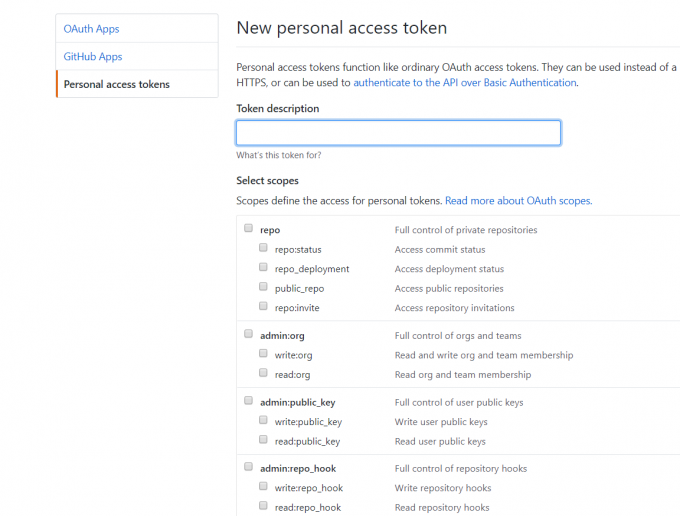
To execute the scan task for GitHub, you need to add a GitHub token for crawl information in GitHub. You can generate a token in tokens. Most access scopes are enough. For the GitLab search, remember to add a token too.
Postman
Obtain the postman.sid cookie:
Rule Configuration
For the Github or Gitlab rule, the rule will be matched by the syntax in the corresponding platforms. Directly, you config what you search at GitHub. You can download the rule import template CSV file, then batch import rules.

Filter Configuration
Filter is only addressed to GitHub search now. There are three classes of filters, including extension, keyword, sec_keyword. For extension and keyword, they can used for blacklist or whitelist.
For more information, you can refer to this video.
Configuration
You are supposed to rename config-temp.yaml to config.yaml and config the database information and other information according to your environment.
GitLab Base Url

项目相关
- 2021-11-12 发布文章《GShark:多平台的敏感信息监测工具》
最近更新
[v1.4.5] - 2024-06-22
修复
- 组件依赖升级
- 修复 API 列表排序问题
- 移除任务列表
[v1.4.4] - 2024-03-23
修复
- 修复数据库初始化的问题
- 修复 Postman 搜索结果格式
- 前端组件安全升级
[v1.4.3] - 2024-03-16
修复
- 组件版本的安全升级
- 修复 golang User-Agent 被 Postman 禁用的问题
- 修复前端缺少 postman 规则选项问题
新增
- 增加 Docker 版本 MySql 的数据持久化
- GitHub client 可以忽略 TLS 错误
[v1.4.2] - 2024-02-03
新增
- 增加 postman 中 request 搜索
更新
- 修改 docker 数据库默认密码
- 增加初始化任务
[v1.4.0] - 2023-12-09
更新
- go-github 组件升级
- GitHub 扫描支持系统代理