---
title: "Plugin Sequencing"
description: "Control the execution order of custom plugins relative to Bifrost's built-in plugins using placement groups and ordering."
icon: "arrow-down-1-9"
---
## Overview
When you have multiple plugins — both built-in and custom — the order in which they execute matters. A logging plugin should capture the final request, an auth plugin should validate before anything else runs, and a response transformer should run after the provider returns data.
Plugin sequencing lets you control **where** your custom plugins execute relative to Bifrost's built-in plugins (telemetry, logging, governance, etc.) and **in what order** they execute relative to each other.
---
## How it works
Bifrost organizes plugins into three **placement groups** that execute in a fixed order:
```mermaid
graph LR
A["Pre-builtin plugins"] --> B["Built-in plugins"]
B --> C["Post-builtin plugins"]
```
| Placement Group | Pre-hooks (request) | Post-hooks (response) |
|-----------------|--------------------|-----------------------|
| `pre_builtin` | Runs **first** | Runs **last** |
| `builtin` | Runs **second** | Runs **second** |
| `post_builtin` | Runs **third** | Runs **first** |
Post-hooks execute in **reverse order** of pre-hooks (LIFO pattern). This means a `pre_builtin` plugin's `PreLLMHook` runs first, but its `PostLLMHook` runs last — ensuring proper cleanup and state unwinding.
### Ordering within a group
Within each placement group, plugins are sorted by their `order` value (lower executes earlier). Plugins with the same order preserve their registration order.
**Example:** Three custom plugins configured as:
| Plugin | Placement | Order | Pre-hook runs | Post-hook runs |
|--------|-----------|-------|---------------|----------------|
| auth-validator | `pre_builtin` | 0 | 1st | 5th (last) |
| request-enricher | `pre_builtin` | 1 | 2nd | 4th |
| *Built-in plugins* | — | — | 3rd | 3rd |
| response-logger | `post_builtin` | 0 | 4th | 2nd |
| analytics | `post_builtin` | 1 | 5th (last) | 1st |
---
## Configuration
1. Navigate to the **Plugins** page in the sidebar
2. Click the **Edit Plugin Sequence** button (appears when you have at least one custom plugin installed)
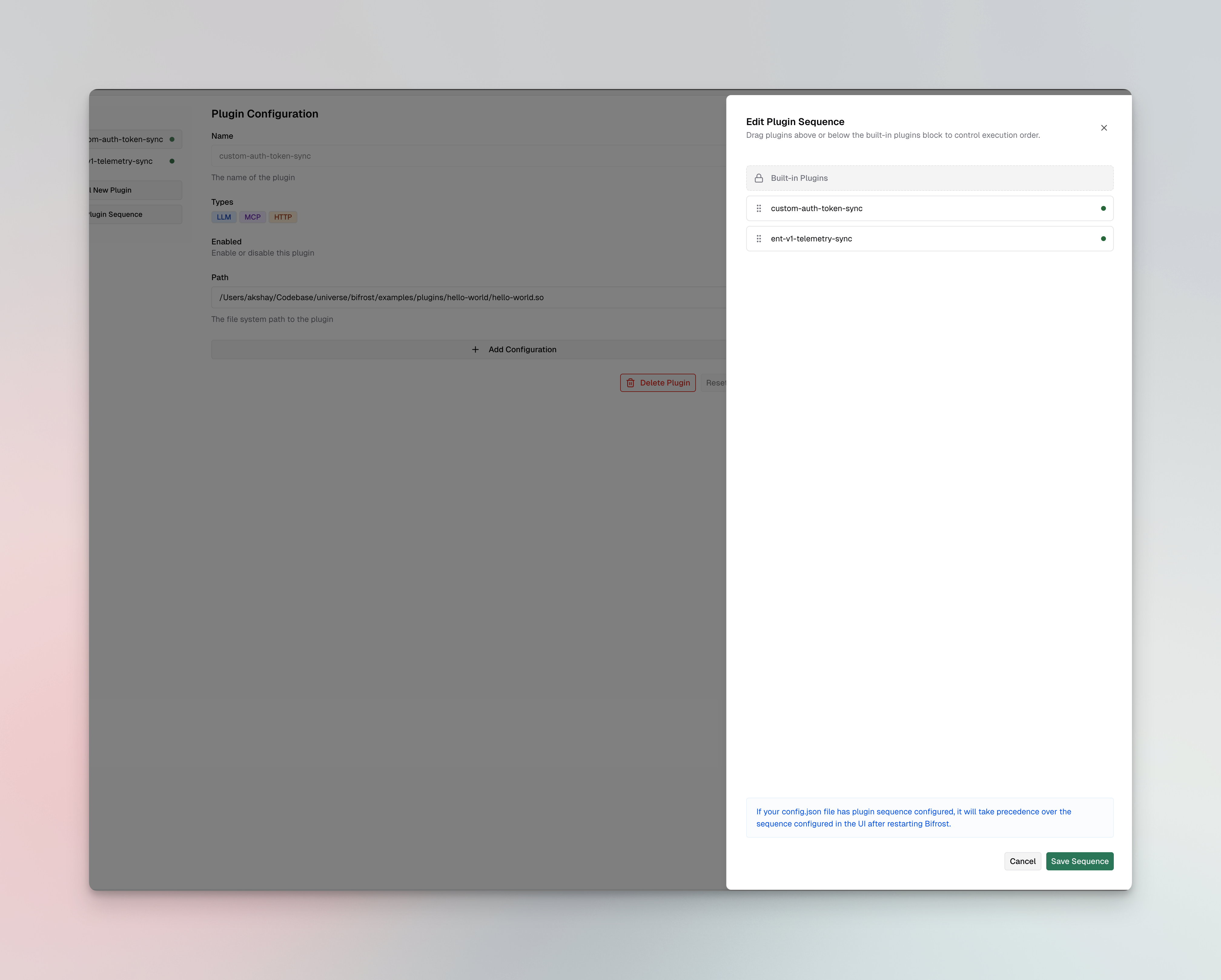
3. **Drag** custom plugins above or below the **Built-in Plugins** block:
- Plugins **above** the block get `pre_builtin` placement
- Plugins **below** the block get `post_builtin` placement
4. The order within each group is determined by position (top = lowest order value)
5. Click **Save Sequence** to apply the changes
If your `config.json` file has plugin sequence configured, it will take precedence over the sequence configured in the UI after restarting Bifrost.
Update a plugin's placement and order using the update endpoint:
```bash
curl -X PUT http://localhost:8080/api/plugins/my-plugin \
-H "Content-Type: application/json" \
-d '{
"enabled": true,
"path": "/path/to/my-plugin.so",
"placement": "pre_builtin",
"order": 0
}'
```
**Response:**
```json
{
"message": "Plugin updated successfully",
"plugin": {
"name": "my-plugin",
"enabled": true,
"isCustom": true,
"path": "/path/to/my-plugin.so",
"placement": "pre_builtin",
"order": 0,
"status": {
"status": "active"
}
}
}
```
You can also set placement when creating a plugin:
```bash
curl -X POST http://localhost:8080/api/plugins \
-H "Content-Type: application/json" \
-d '{
"name": "my-plugin",
"enabled": true,
"path": "/path/to/my-plugin.so",
"placement": "pre_builtin",
"order": 0
}'
```
Set `placement` and `order` on each plugin in the `plugins` array:
```json
{
"plugins": [
{
"name": "auth-validator",
"enabled": true,
"path": "/plugins/auth-validator.so",
"placement": "pre_builtin",
"order": 0
},
{
"name": "request-enricher",
"enabled": true,
"path": "/plugins/request-enricher.so",
"placement": "pre_builtin",
"order": 1
},
{
"name": "response-logger",
"enabled": true,
"path": "/plugins/response-logger.so",
"placement": "post_builtin",
"order": 0
}
]
}
```
| Field | Type | Required | Default | Description |
|-------|------|----------|---------|-------------|
| `placement` | string | No | `post_builtin` | `"pre_builtin"` or `"post_builtin"`. Controls whether the plugin runs before or after built-in plugins. |
| `order` | integer | No | `0` | Position within the placement group. Lower values execute earlier. |
---
## When to use each placement
### `pre_builtin` — run before built-in plugins
Use this when your plugin needs to:
- **Validate or authenticate** requests before any built-in processing
- **Enrich requests** with data that built-in plugins should see (e.g., injecting headers or metadata)
- **Short-circuit** requests before they reach governance checks or telemetry
### `post_builtin` (default) — run after built-in plugins
Use this when your plugin needs to:
- **Transform responses** after all built-in processing is complete
- **Log or analyze** the final request/response (after governance, telemetry, etc.)
- **Add custom headers** or modify the response before it reaches the client
When in doubt, use the default `post_builtin` placement. Most custom plugins — logging, analytics, response transformations — work best after built-in plugins have finished their processing.
---
## Next steps
- **[Writing a Go plugin](./writing-go-plugin)** — Build your first custom plugin with `PreLLMHook` and `PostLLMHook`
- **[Writing a WASM plugin](./writing-wasm-plugin)** — Build a portable WASM plugin
- **[Plugin architecture](../architecture/core/plugins)** — Deep dive into the plugin lifecycle and hook execution model