 Nayan
6c3d84f1d3
Nayan
6c3d84f1d3
The proxy bound every interface — server.listen with no host — and the
control WebSocket completed any upgrade with no Origin or Host check. That
socket drives a coding agent with write access to the project, so anyone
routable to the machine, or any page open in the developer's browser
(WebSocket handshakes are not subject to CORS), could edit files, commit,
and open PRs under the user's identity. Reported in #15 by yarikbright,
with the repro this change's tests replay.

Three checks, each stopping an attack the other two do not:

- bind 127.0.0.1 by default (the posture opencode-server.ts always had) —
  stops the LAN attacker; --host / AIRSHIP_HOST opts out, with a loud
  launch warning that a wide bind is an unauthenticated agent
- an exact-match Host allowlist (localhost and IP literals always pass;
  --allowed-hosts adds names) — stops DNS rebinding, where the attacker's
  Origin and Host match and an Origin check alone waves them through
- Origin-matches-Host on every upgrade, control socket and HMR tunnel
  alike, refused with a real 403 before the upgrade completes. An absent
  Origin (curl, CLI) is allowed; Origin: null is not.

The Host gate sits ahead of even the editor's own assets, so a blocked
page cannot fetch overlay.js. requireHost accepts IPv6 literals bare or
bracketed, EADDRNOTAVAIL now names the interface it could not find, and
the printed URL follows the bind (wildcards present as localhost so it
stays clickable). SECURITY.md states the model and its deliberate limits.
The README's "runs entirely on localhost" is now an enforced default
rather than an unchecked claim.

Reported-by: yarikbright
Closes #15
565 lines
26 KiB
Markdown
565 lines
26 KiB
Markdown
<!-- Generated from the root README.md by scripts/sync-readme.mjs. Do not edit. -->
|
|
|
|
# Airship
|
|
|
|
[](https://www.npmjs.com/package/@airshiplabs/cli)
|
|
[](https://nodejs.org)
|
|
[](https://github.com/0xnyn/airship/blob/main/LICENSE)
|
|
|
|
**Visual editor for your codebase.**
|
|
|
|
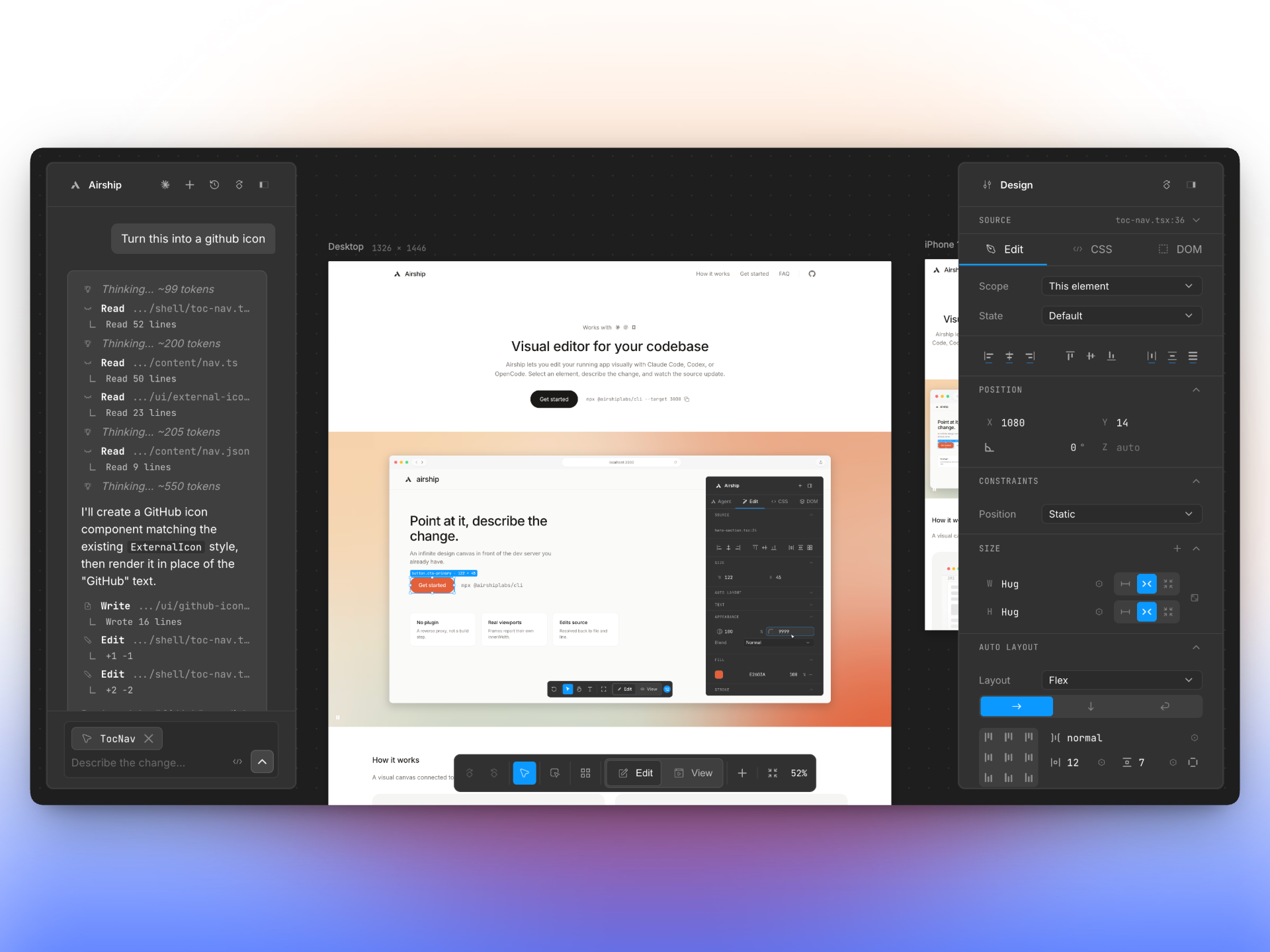
Airship puts an infinite design canvas in front of your dev server. Select an element, describe
|
|
the change, and watch Claude Code, Codex or OpenCode update the source — without rebuilding your
|
|
UI in a separate design tool.
|
|
|
|
|
|
|
|
```bash
|
|
npx @airshiplabs/cli --target 3000
|
|
```
|
|
|
|
No plugin. No config. Nothing added to your dependencies or your bundle.
|
|
|
|
[airship.design](https://airship.design) · [CLI reference](#cli-reference) · [Configuration](#configuration) · [Questions](#questions)
|
|
|
|
---
|
|
|
|
## Quick start
|
|
|
|
|
|
|
|
**1. Start your app the way you always do.**
|
|
|
|
```bash
|
|
pnpm dev # http://localhost:3000
|
|
```
|
|
|
|
Works with Vite, Next, Remix, Rails, or anything that serves HTML over HTTP. No plugins
|
|
required.
|
|
|
|
**2. Point Airship at your dev server.**
|
|
|
|
```bash
|
|
npx @airshiplabs/cli --target 3000
|
|
```
|
|
|
|
Airship connects to the port you're already running and opens the visual editor on the next
|
|
free port. Or install it once and use the `airship` binary:
|
|
|
|
```bash
|
|
npm i -g @airshiplabs/cli
|
|
airship --target 3000
|
|
```
|
|
|
|
**3. Bring your coding agent.**
|
|
|
|
```bash
|
|
airship --target 3000 --agent codex --safe
|
|
```
|
|
|
|
Pick the agent you already use and start making changes without running a separate agent
|
|
interface.
|
|
|
|
Airship uses the authentication you already have configured for Claude Code, Codex, or
|
|
OpenCode. Run `airship doctor` if something does not work.
|
|
|
|
### Or let it start your dev server too
|
|
|
|
`--exec` starts your dev server and stops it again when Airship exits. Leave `--target` off and
|
|
it reads the port from your `package.json`:
|
|
|
|
```bash
|
|
airship --exec "pnpm dev"
|
|
```
|
|
|
|
Run `airship` on its own and it just asks you for the port, the agent and the mode.
|
|
|
|
## What it is
|
|
|
|
A CLI, and nothing else.
|
|
|
|
- **Nothing goes into your project.** Airship runs in front of the dev server you already have.
|
|
Your build, your config and your dependencies are untouched.
|
|
- **Every frame is a real browser window.** A phone frame behaves like a phone, however far you
|
|
zoom out. Mobile and desktop sit side by side — both live, both editable, one source file.
|
|
- **Changes land in your code.** Click an element and Airship knows the file and line that drew
|
|
it. Describe the change, get the diff, undo it if you don't like it.
|
|
- **Nothing leaves your machine.** No account, no telemetry, no service to sign up for.
|
|
|
|
|
|
|
|
|
|
## Canvas or inline
|
|
|
|
Two ways to look at your app. Same editor either way.
|
|
|
|
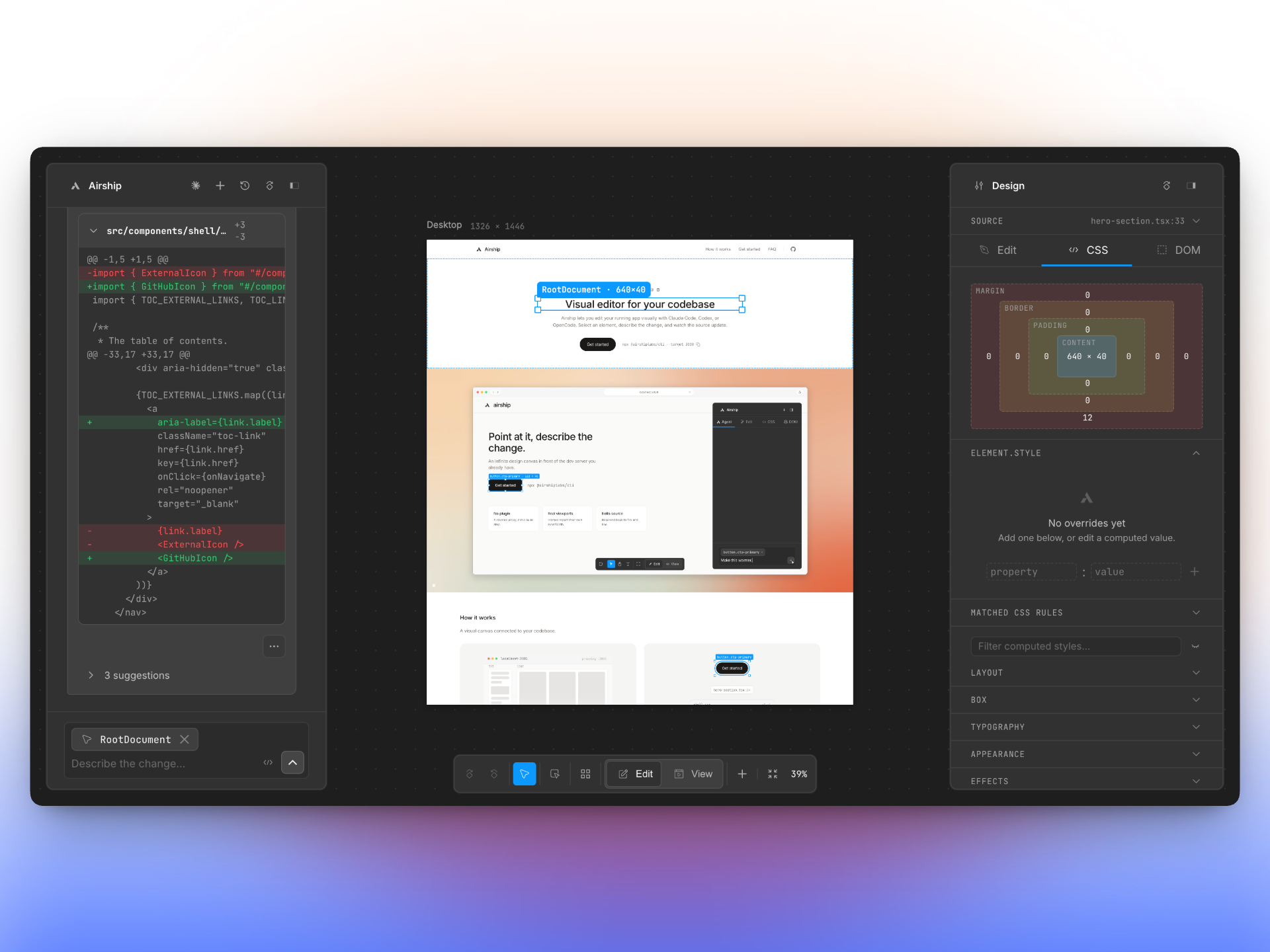
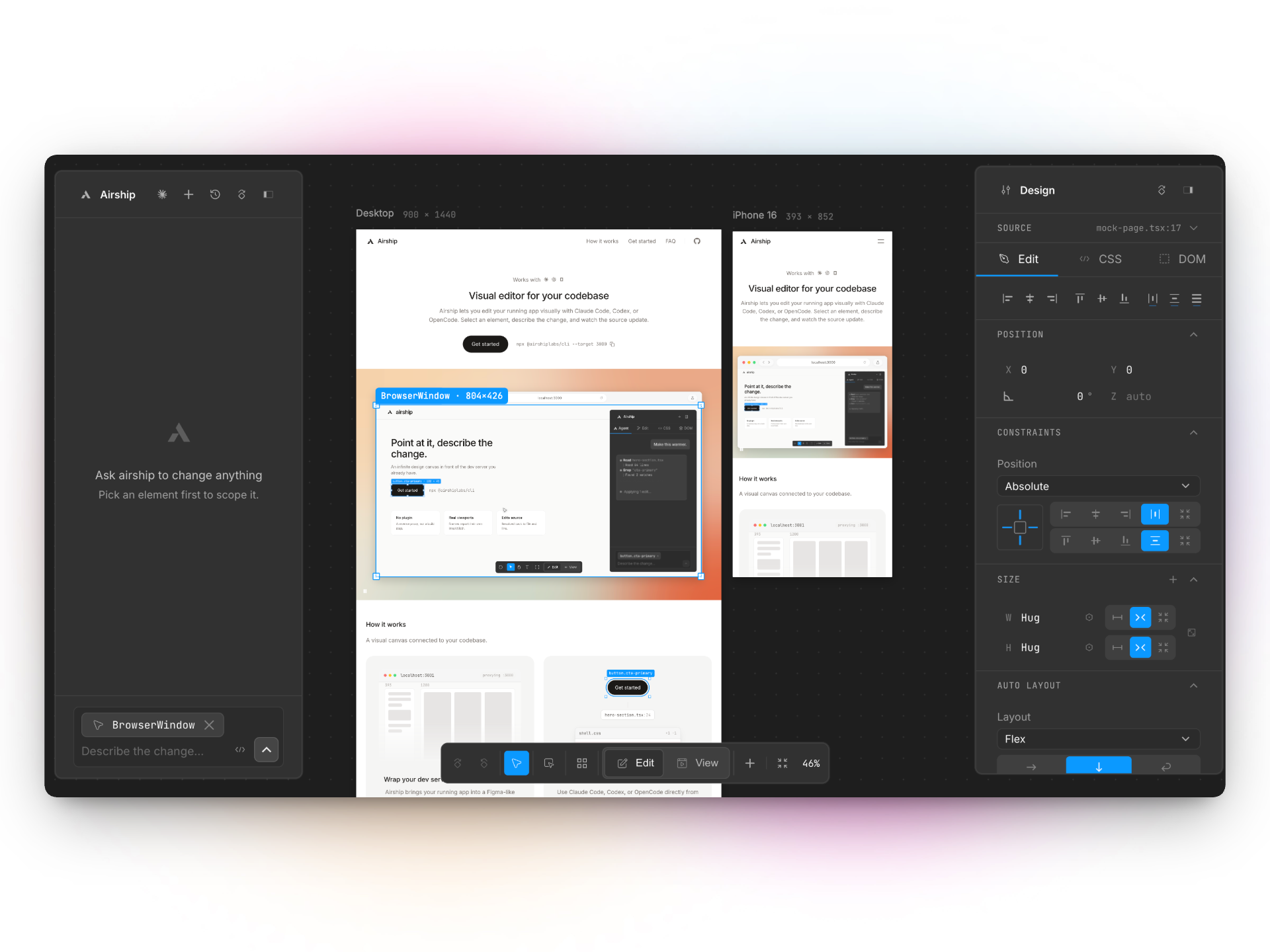
**`canvas`** (default) — your app on a pannable canvas, one live frame per device size.
|
|
|
|
|
|
|
|
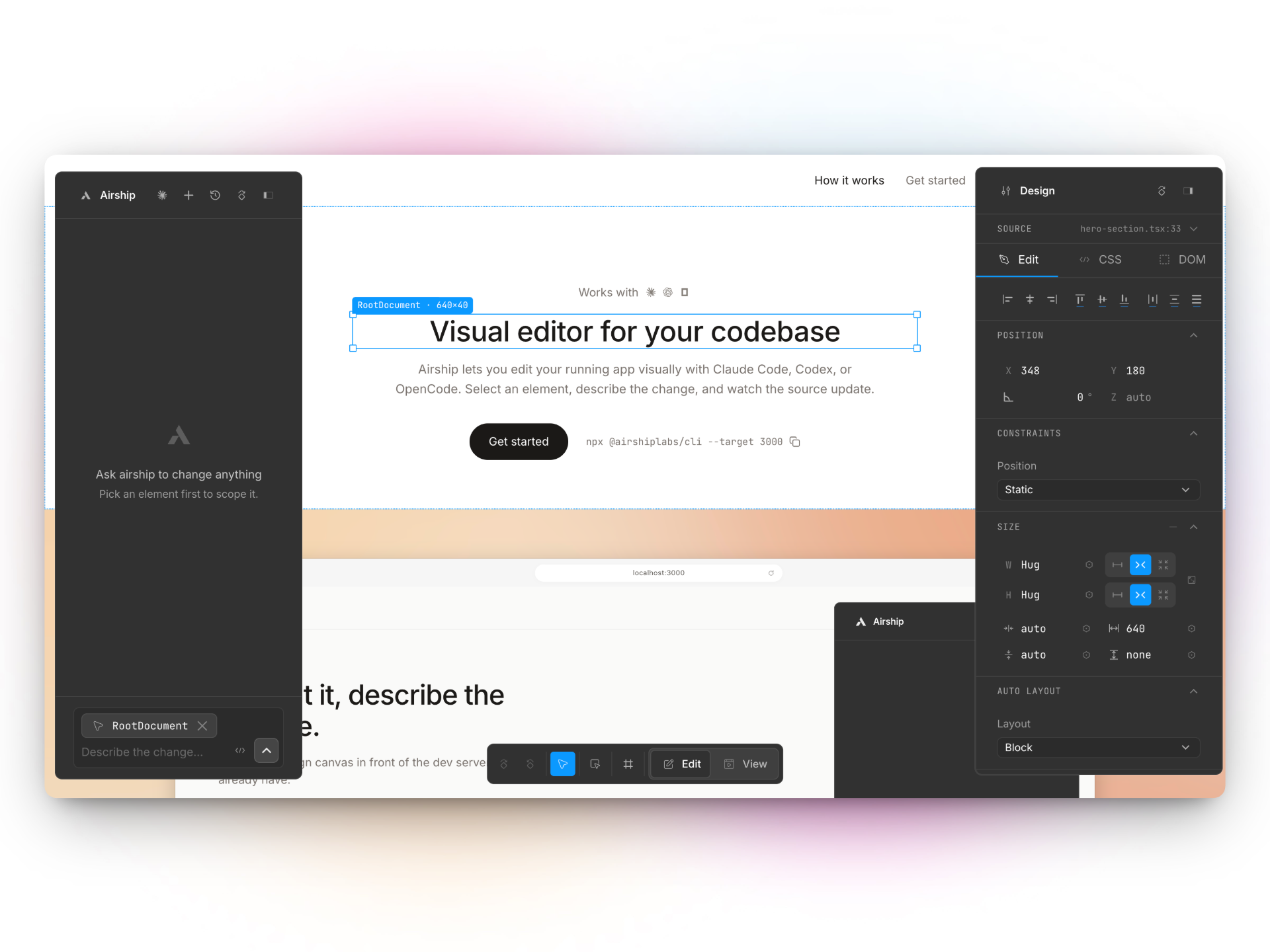
**`inline`** — the editor on top of your own page, one window.
|
|
|
|
|
|
|
|
Pick one at launch with `airship --mode inline`, or switch any time from the bottom bar. Your
|
|
choice sticks across reloads and as you click around your app. Add `?__airship=inline` to a URL
|
|
to try the other one once, without changing your preference; `?__airship=shell` is the way back
|
|
to the canvas — the parameter takes the internal mode name, so it is `shell`, not `canvas`.
|
|
|
|
Open any route of your app in Airship — `/pricing`, `/settings` — and every frame opens there.
|
|
|
|
The controls, in short — the table below is generated from the editor's own command
|
|
catalog, so it cannot drift from what the keys actually do:
|
|
|
|
<!-- controls:start -->
|
|
| | macOS | Windows / Linux |
|
|
| --- | --- | --- |
|
|
| pan the canvas | Wheel / two-finger | Wheel / two-finger |
|
|
| zoom at the cursor | ⌘-wheel / pinch | Ctrl-wheel / pinch |
|
|
| pan without the hand | Space-drag | Space-drag |
|
|
| select an element | Click | Click |
|
|
| edit text in place | Double-click | Double-click |
|
|
| open the element menu | Right-click | Right-click |
|
|
| scrub a number | Drag a field's glyph | Drag a field's glyph |
|
|
| undo | ⌘Z | Ctrl+Z |
|
|
| delete element | ⌫ or Del | Backspace or Del |
|
|
| duplicate | ⌘D | Ctrl+D |
|
|
| edit text | ↩ or T | Enter or T |
|
|
| move | V | V |
|
|
| inspect | I | I |
|
|
| zoom in | ⌘= or = | Ctrl+= or = |
|
|
| zoom out | ⌘- or - | Ctrl+- or - |
|
|
| zoom to 100% | ⌘0 or ⇧0 | Ctrl+0 or Shift+0 |
|
|
| zoom to fit | ⇧1 | Shift+1 |
|
|
| hand tool | H | H |
|
|
| add a frame | F | F |
|
|
| send | ⌘↩ | Ctrl+Enter |
|
|
| keyboard shortcuts | ? | ? |
|
|
| command palette | ⌘K | Ctrl+K |
|
|
|
|
Press `?` in the editor for all of them, or see [CONTROLS.md](https://github.com/0xnyn/airship/blob/main/CONTROLS.md).
|
|
<!-- controls:end -->
|
|
|
|
## Edit and View
|
|
|
|
The two modes point the editor at different things, and the panels follow.
|
|
|
|
**Edit** is about an element: hover to highlight, click to select, and the agent panel and
|
|
inspector are open on either side of it.
|
|
|
|
**View** is about your frames. The page underneath is fully interactive — click through it,
|
|
fill in forms, scroll — so there is no element selection, and the two panels that depend on
|
|
one step aside. In their place the left panel lists every frame, and a minimap appears in
|
|
the bottom-right corner:
|
|
|
|
- Click a frame in the list to go to it without changing your zoom; double-click to zoom
|
|
to it. Rename it in place, and use `⋯` for its device size, rotate, duplicate and delete.
|
|
- The list is stacking order, front-most at the top. Drag a row anywhere along it — or
|
|
press ↑↓ on its handle — to restack frames that overlap on the canvas; up is forward.
|
|
- Drag the minimap's indicator and the canvas travels with it; press anywhere else on the
|
|
map to jump there. Pan far off your frames and it keeps pointing back at them.
|
|
|
|
Your panel arrangement is remembered per mode, so switching back returns the inspector
|
|
exactly as you left it.
|
|
|
|
## Inspector
|
|
|
|
Click an element and it fills the inspector. Every tab is looking at the same thing.
|
|
|
|
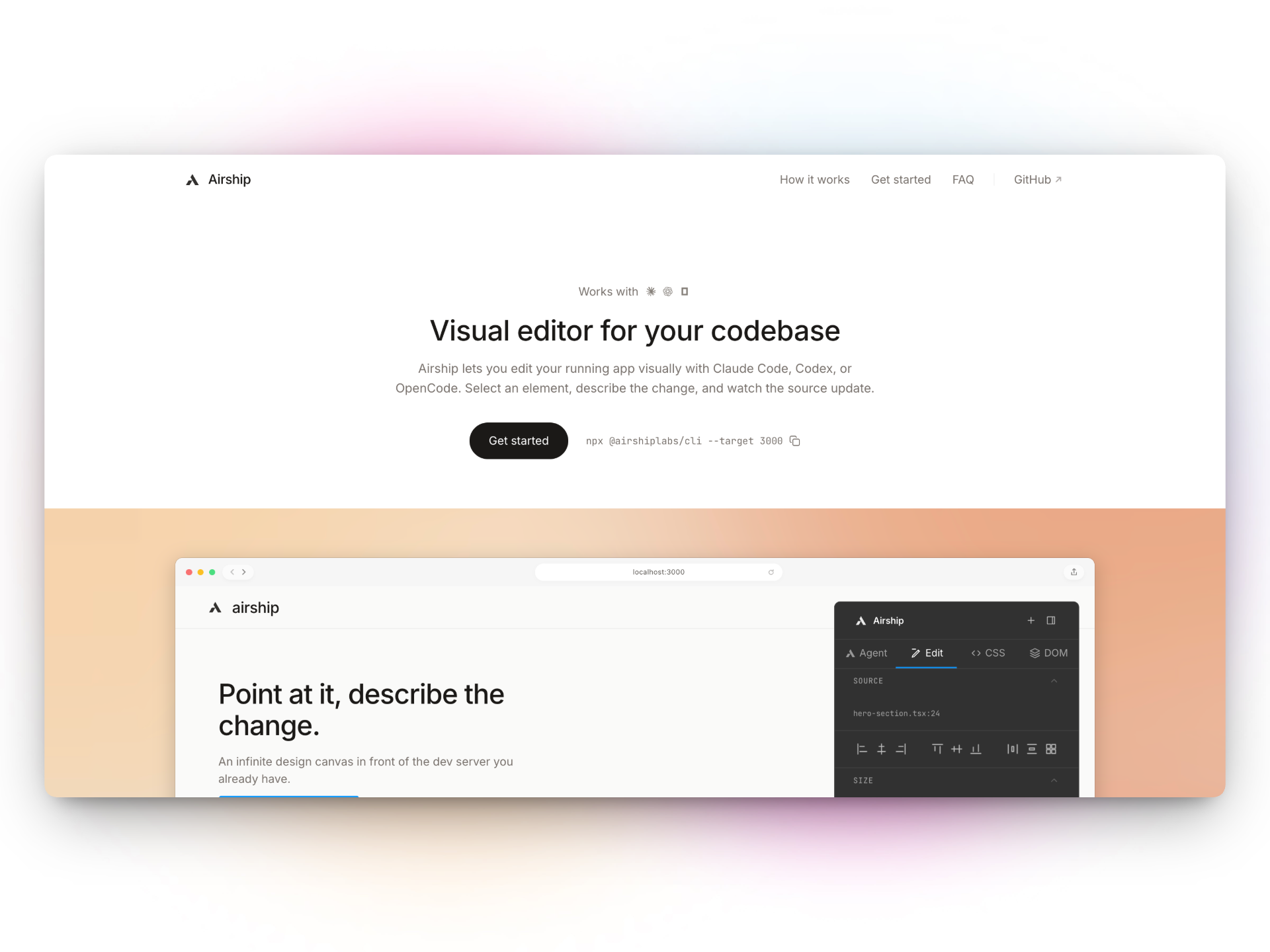
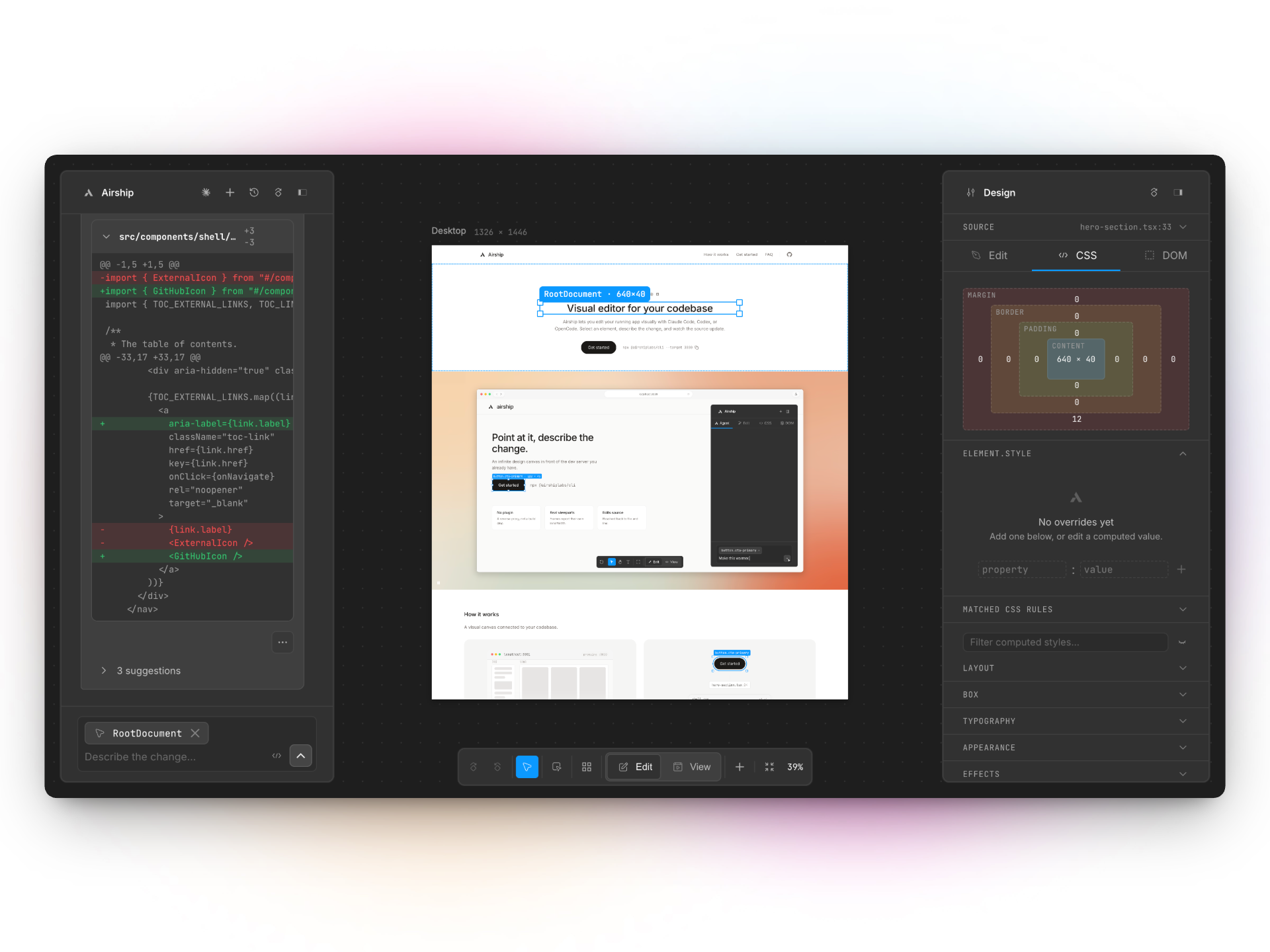
`Edit` is position, size, spacing and layout — the shot up in [Quick start](#quick-start). `CSS`
|
|
is the box model, the rules that are actually hitting the element, and your own tweaks on top:
|
|
|
|
|
|
|
|
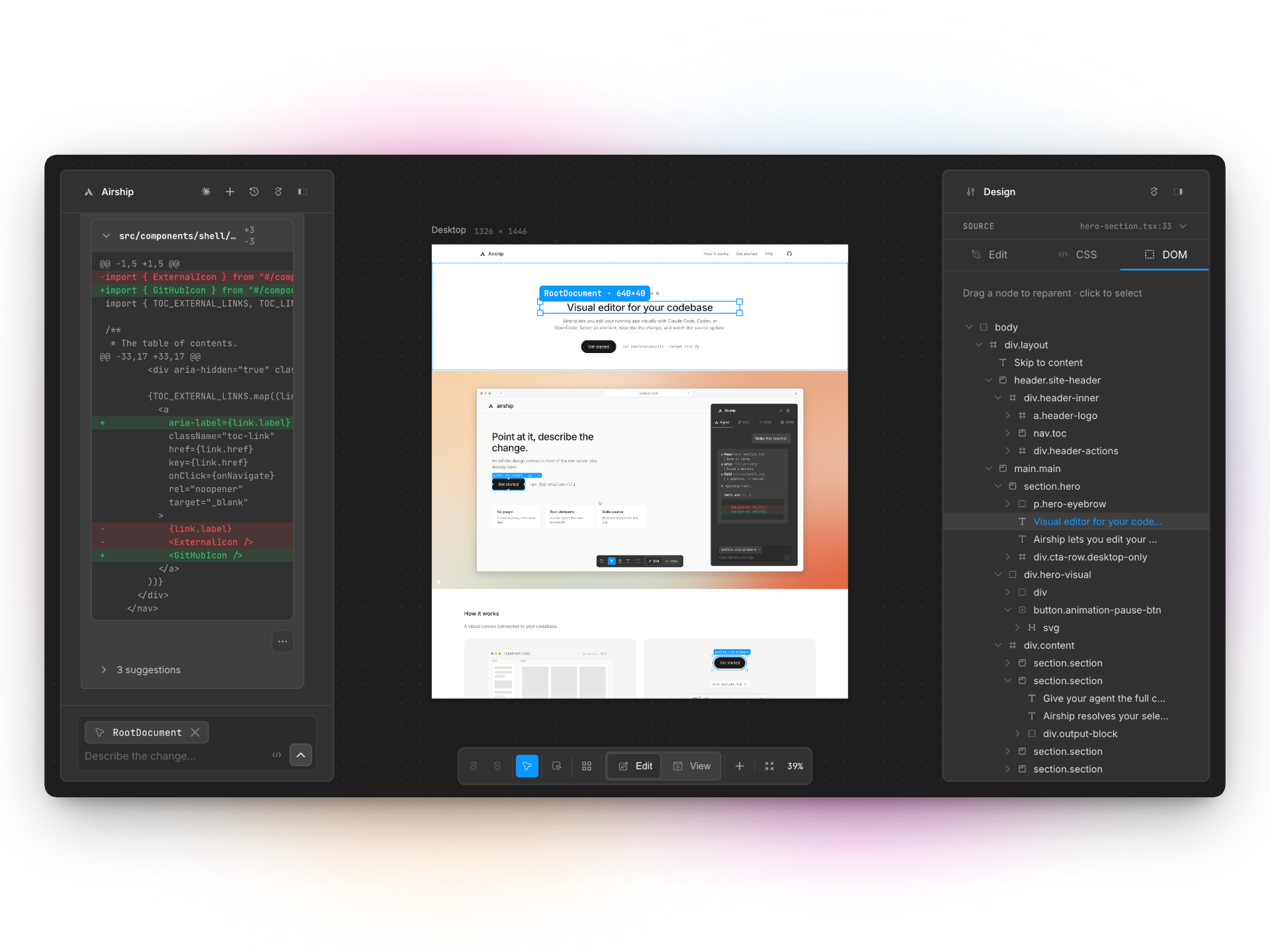
`DOM` is the tree. Click a node to select it, or drag one to move it somewhere else:
|
|
|
|
|
|
|
|
## Agents
|
|
|
|
Pick one with `--agent`, or switch between them as you go. They are not equal, and Airship tells
|
|
you what you're giving up at startup.
|
|
|
|
| | `claude` (default) | `codex` | `opencode` |
|
|
| --- | --- | --- | --- |
|
|
| Watch it write | word by word | the whole reply at once, at the end | word by word |
|
|
| Pick up an old chat | yes | yes | yes |
|
|
| Branch off a chat | yes | starts fresh, and says so | yes, history kept |
|
|
| Shows what it cost | in dollars | tokens only | in dollars |
|
|
| `--effort` | yes | yes | **ignored** |
|
|
| `--max-turns`, `--max-budget` | yes | **ignored** | **ignored** |
|
|
| `--model` | a model name | a model name | needs the `provider/model` form |
|
|
| Lists its own models | yes | **no** — Airship ships a list | yes, the ones you are signed in to |
|
|
| `--safe` | checks each edit and command | **real sandbox** | asks before each edit and command |
|
|
| Install | included | included | **you install it yourself** |
|
|
|
|
Undo is Airship's, not the agent's. It keeps the previous version of every file it touches, so
|
|
undo works on all three. One catch: `codex` and `opencode` get that previous version from Git,
|
|
so **undo needs your project to be a Git repo on those two**. Airship warns you at startup.
|
|
|
|
One more `opencode` quirk: the one-line summary and the follow-up suggestion chips come from a
|
|
JSON block the model is asked to append to its reply. A model that ignores the instruction
|
|
loses the chips and gets a plainer commit message — never the edit itself. Models with thinking
|
|
enabled reject opencode's own structured-output request outright; Airship detects that, retries
|
|
the turn without it, and remembers not to ask that model again.
|
|
|
|
### Authentication
|
|
|
|
Airship reuses whatever the chosen agent already has, and warns at startup if it finds nothing.
|
|
|
|
| Agent | Needs one of |
|
|
| --- | --- |
|
|
| `claude` | `ANTHROPIC_API_KEY`, `CLAUDE_CODE_OAUTH_TOKEN`, or a `claude` login (`~/.claude`) |
|
|
| `codex` | `CODEX_API_KEY`, `OPENAI_API_KEY`, or a `codex login` (`~/.codex/auth.json`) |
|
|
| `opencode` | the `opencode` binary on PATH, **plus** a provider key or an `opencode auth login` |
|
|
|
|
OpenCode is a separate install — `brew install sst/tap/opencode` or `npm i -g opencode-ai` —
|
|
and accepts `ANTHROPIC_API_KEY`, `OPENAI_API_KEY`, `OPENCODE_API_KEY`, `OPENROUTER_API_KEY`,
|
|
`GEMINI_API_KEY`, `GOOGLE_GENERATIVE_AI_API_KEY`, `AWS_BEARER_TOKEN_BEDROCK` or
|
|
`AWS_ACCESS_KEY_ID`.
|
|
|
|
## Safety
|
|
|
|
**By default the agent runs unsandboxed.** It can write anywhere you can and reach the network —
|
|
the same access it has when you run it from your terminal. Pass `--safe` to confine it:
|
|
|
|
| | default | `--safe` |
|
|
| --- | --- | --- |
|
|
| `codex` | full access, network on | locked to your project folder, no network, no web search |
|
|
| `claude` | full access, no sandbox | edits kept inside your project, dangerous commands blocked |
|
|
| `opencode` | full access | asks before every edit and command, checked the same way; no web fetch, no web search, nothing outside your project |
|
|
|
|
`--safe` is not equally strong on all three, and the CLI says so at launch:
|
|
|
|
- **Only `codex` gets a real sandbox.** The operating system stops it writing outside your
|
|
project. On `claude` and `opencode`, Airship checks each edit and command first — a good
|
|
check, but a check, not a wall.
|
|
- **That check looks for known-dangerous commands; it does not understand shell.** It catches
|
|
`rm -rf`. It does not catch a write pointed somewhere else, like `echo x > /elsewhere`.
|
|
- **`claude` and `opencode` can still reach the network.** Airship switches off their web tools,
|
|
but nothing stops a command they run from opening a connection anyway. Only a sandbox can.
|
|
|
|
If a hard guarantee matters more to you than which agent you use, run
|
|
`airship --agent codex --safe`.
|
|
|
|
Diffs and undo work the same either way — `--safe` has no effect on them.
|
|
|
|
## CLI reference
|
|
|
|
```
|
|
airship [options]
|
|
airship --target <port> [options]
|
|
airship <command> [options]
|
|
```
|
|
|
|
| Command | |
|
|
| --- | --- |
|
|
| `airship` | Launch the visual editor against your dev server. Bare at a terminal, it asks first. |
|
|
| `airship init` | Create an `airship.config.json` for this project. |
|
|
| `airship doctor` | Check your environment and report what is wrong. |
|
|
|
|
Flags accept `--flag value` and `--flag=value`, a camelCase spelling of any kebab name
|
|
(`--maxTurns` ≡ `--max-turns`), and `--no-<name>` to turn any boolean off. A bare `--` stops flag
|
|
parsing — airship takes no positional arguments, so anything after it is ignored rather than
|
|
forwarded.
|
|
|
|
### Core
|
|
|
|
| Flag | | Default |
|
|
| --- | --- | --- |
|
|
| `-t, --target <port>` | Port your dev server is already running on. Detected from your `package.json` when omitted. | |
|
|
| `-p, --port <port>` | Port for the airship proxy. | `target + 1` |
|
|
| `--host <address>` | Interface the proxy listens on. See [`--host`](#--host) before widening it. | `127.0.0.1` |
|
|
| `--allowed-hosts <names>` | Extra hostnames airship answers to, repeatable or comma-separated. `localhost` and IP addresses are always allowed. | |
|
|
| `--cwd <dir>` | Project root for edits. | current directory |
|
|
| `--mode <name>` | Editor mode: `canvas` or `inline`. Switchable from the editor too. | `canvas` |
|
|
| `--exec <command>` | Start your dev server with this command and stop it when airship exits. | |
|
|
| `--open` | Open the editor in your browser once it is listening. | |
|
|
| `--keep-csp` | Keep your app's `Content-Security-Policy` on editor surfaces instead of stripping it. Framing headers (`X-Frame-Options`) are always stripped. | off |
|
|
|
|
### Agent
|
|
|
|
| Flag | | Default |
|
|
| --- | --- | --- |
|
|
| `-a, --agent <name>` | Coding agent: `claude`, `codex`, `opencode`. | `claude` |
|
|
| `-m, --model <id>` | Model for whichever agent runs. Per-backend flags below outrank it. | the agent's own default |
|
|
| `--effort <level>` | Reasoning effort: `minimal`, `low`, `medium`, `high`, `xhigh`, `max`. | |
|
|
| `--max-turns <n>` | Cap agent turns per edit (claude only). | `24` |
|
|
| `--max-budget <usd>` | Stop an edit if it exceeds this cost in USD (claude only). | |
|
|
| `--commit` | Auto-commit each accepted edit (Conventional Commits). | |
|
|
|
|
`-m` is `--model`, not `--mode`. `--mode` has no short alias.
|
|
|
|
You can also pick the model from the editor. The agent button in the chat header opens a
|
|
group per backend; choosing a row picks the backend **and** its model in one go, and a box
|
|
at the bottom takes any id the list does not offer. That choice is per backend and is
|
|
remembered, so switching between them does not carry one backend's model to another. The
|
|
flags below are the resting default it starts from.
|
|
|
|
### Sandbox
|
|
|
|
| Flag | | Default |
|
|
| --- | --- | --- |
|
|
| `--safe` | Confine edits to the project directory and cut network access. See [Safety](#safety). | off |
|
|
|
|
### Backend
|
|
|
|
| Flag | | Default |
|
|
| --- | --- | --- |
|
|
| `--claude-model <id>` | Model for the `claude` backend. Takes an alias or a full id. | `--model`, then the agent's own |
|
|
| `--codex-model <id>` | Model for the `codex` backend. | `--model`, then the agent's own |
|
|
| `--opencode-model <provider/model>` | Model for the `opencode` backend. Needs the `provider/model` form. | `--model`, then the agent's own |
|
|
| `--codex-path <path>` | Path to the `codex` binary. | bundled |
|
|
| `--codex-config <k=v>` | Extra `codex --config` pair; repeatable. | |
|
|
| `--opencode-path <path>` | Path to the `opencode` binary. | found on PATH |
|
|
| `--opencode-url <url>` | Attach to a running `opencode serve` instead of starting one. | |
|
|
| `--opencode-agent <name>` | Run as a named opencode agent. | its own |
|
|
| `--opencode-config <file>` | JSON file merged into the opencode server config. | |
|
|
|
|
`--codex-config` reads the shape of the value: `true`/`false` become TOML booleans and anything
|
|
numeric becomes a number, so `--codex-config network_access=true` sends a boolean, not the string.
|
|
Quote it — `--codex-config k='"true"'` — to keep a string a string.
|
|
|
|
### Global
|
|
|
|
| Flag | |
|
|
| --- | --- |
|
|
| `--json` | Machine-readable JSON on stdout, no colour and no banner. |
|
|
| `-q, --quiet` | Suppress the launch banner. Warnings still print. |
|
|
| `--debug` | Print stack traces on failure. |
|
|
| `-h, --help` | Show this help. |
|
|
| `-v, --version` | Print the version. |
|
|
|
|
Banners, warnings and errors go to stderr; `--json` payloads, help and `--version` go to stdout,
|
|
so `airship --json | jq` is reliable.
|
|
|
|
### `airship init`
|
|
|
|
Writes an `airship.config.json` from the same questions the bare `airship` wizard asks, so it
|
|
stops asking. Takes `--cwd` and the global flags. Needs a terminal.
|
|
|
|
### `airship doctor`
|
|
|
|
Checks, in order: `node`, `airship`, `config`, `git repo`, `overlay bundle`, `agent claude`,
|
|
`agent codex`, `agent opencode`, `dev server`. Each reports `ok`, `warn` or `fail` with a hint.
|
|
Only your preferred agent (`--agent`, default `claude`) can fail the run; the other two warn.
|
|
|
|
Exits `1` if any check failed, so `airship doctor && airship` works. Takes `--cwd`, `--target`,
|
|
`--agent` and the global flags.
|
|
|
|
### Exit codes
|
|
|
|
| Code | |
|
|
| --- | --- |
|
|
| `0` | Fine. |
|
|
| `1` | Something failed. |
|
|
| `2` | Bad flag, bad value, or a terminal was needed and there wasn't one. |
|
|
| `127` | Not an airship command. |
|
|
| `130` | Interrupted — Ctrl-C, or a cancelled prompt. |
|
|
|
|
## Configuration
|
|
|
|
Settings resolve in this order, highest first:
|
|
|
|
```
|
|
flags → AIRSHIP_* environment → airship.config.json → defaults
|
|
```
|
|
|
|
### The config file
|
|
|
|
`airship.config.json`, or an `"airship"` key in your `package.json`. Run `airship init` to write
|
|
one. Every key is a flag name, in either kebab or camel case:
|
|
|
|
```json
|
|
{
|
|
"agent": "claude",
|
|
"mode": "canvas",
|
|
"target": 3000,
|
|
"safe": true,
|
|
"claudeModel": "opus",
|
|
"codexModel": "gpt-5.3-codex"
|
|
}
|
|
```
|
|
|
|
Models are keyed per backend — `claudeModel`, `codexModel`, `opencodeModel` — because the
|
|
editor's picker can switch backends mid-session, and one shared `model` would follow it and
|
|
hand Codex an id only Claude answers to. A plain `"model"` still works and applies to
|
|
whichever backend runs, with the per-backend keys taking precedence.
|
|
|
|
Airship looks for it from `--cwd` upwards and **stops at your repository root**, so a stray
|
|
config file somewhere above your repo won't affect you. Misspell a key and it says so, with a
|
|
suggestion — it never quietly ignores one.
|
|
|
|
### Environment
|
|
|
|
Every flag except `--help` and `--version` has an environment variable: `AIRSHIP_` plus the flag
|
|
name uppercased, with `-` as `_`.
|
|
|
|
```
|
|
AIRSHIP_TARGET AIRSHIP_AGENT AIRSHIP_CODEX_PATH
|
|
AIRSHIP_PORT AIRSHIP_MODEL AIRSHIP_CODEX_CONFIG
|
|
AIRSHIP_CWD AIRSHIP_EFFORT AIRSHIP_OPENCODE_PATH
|
|
AIRSHIP_MODE AIRSHIP_MAX_TURNS AIRSHIP_OPENCODE_URL
|
|
AIRSHIP_EXEC AIRSHIP_MAX_BUDGET AIRSHIP_OPENCODE_AGENT
|
|
AIRSHIP_OPEN AIRSHIP_COMMIT AIRSHIP_OPENCODE_CONFIG
|
|
AIRSHIP_SAFE AIRSHIP_JSON AIRSHIP_OPENCODE_MODEL
|
|
AIRSHIP_DEBUG AIRSHIP_QUIET AIRSHIP_CLAUDE_MODEL
|
|
AIRSHIP_KEEP_CSP AIRSHIP_HOST AIRSHIP_CODEX_MODEL
|
|
AIRSHIP_ALLOWED_HOSTS
|
|
```
|
|
|
|
`AIRSHIP_HELP` and `AIRSHIP_VERSION` are deliberately not read — exporting one would leave the
|
|
CLI unable to run anything. Booleans take `1`/`true`/`yes`/`on` or `0`/`false`/`no`/`off`;
|
|
anything else is an error rather than a guess.
|
|
|
|
Four more are honoured: `AIRSHIP_EDITOR` (`vscode`, `cursor`, `windsurf` or `zed` — which
|
|
editor "open in editor" prefers, otherwise probed in that order), `AIRSHIP_AGENT_DEBUG` (stream
|
|
the Claude backend's raw stderr to the terminal — separate from `--debug`, which logs airship
|
|
itself), and `NO_COLOR` / `FORCE_COLOR`.
|
|
|
|
### `--cwd`
|
|
|
|
`--cwd` is the folder your dev server treats as its root, which is not always your repository
|
|
root. Airship needs it to turn the paths your dev server reports (`/src/app.tsx`) into real
|
|
files on disk. In a monorepo where the app lives in `apps/web`, that's `--cwd apps/web`.
|
|
|
|
### `--host`
|
|
|
|
Airship listens on `127.0.0.1`, so only your own machine can reach the editor. That is a safety
|
|
posture, not a limitation: the editor is an unauthenticated server that can drive a coding agent
|
|
with write access to your project, and airship warns loudly whenever you widen it. Three setups
|
|
need the extra flags:
|
|
|
|
- **Docker.** Publishing the editor's port with `docker run -p` needs `--host 0.0.0.0` — a
|
|
loopback bind inside the container is unreachable from outside it, and the symptom is a bare
|
|
connection-refused.
|
|
- **A phone or another machine on your network.** `--host 0.0.0.0`, then open
|
|
`http://<your-ip>:<port>`. While airship runs, anything on that network can drive the agent —
|
|
treat it like leaving a terminal unlocked.
|
|
- **A hostname** — an `/etc/hosts` alias, a tunnel, a reverse proxy. Requests under a name are
|
|
refused unless it is the `--host` value or listed in `--allowed-hosts`. `localhost` and IP
|
|
addresses are always accepted; names must match exactly (no subdomains), which is what blocks
|
|
DNS rebinding. Airship never reads `X-Forwarded-Host` — behind a reverse proxy, put the public
|
|
name in `--allowed-hosts`.
|
|
|
|
## Port detection
|
|
|
|
Leave `--target` off and Airship works it out, trying each likely port in turn and taking the
|
|
first one that answers:
|
|
|
|
1. **The port in your dev script** — a `--port`, `-p` or `PORT=` in `scripts.dev`, `scripts.start`
|
|
or `scripts.serve`.
|
|
2. **Your framework's default**, by what is in your dependencies:
|
|
|
|
| Dependency | Port |
|
|
| --- | --- |
|
|
| `next`, `nuxt`, `@remix-run/dev`, `react-scripts` | `3000` |
|
|
| `parcel` | `1234` |
|
|
| `@angular/cli` | `4200` |
|
|
| `astro` | `4321` |
|
|
| `@sveltejs/kit`, `vite` | `5173` |
|
|
| `storybook` (or any `@storybook/*`) | `6006` |
|
|
| `gatsby` | `8000` |
|
|
| `@11ty/eleventy` | `8080` |
|
|
|
|
Most specific first — a project with both `vite` and `storybook` is a Vite app that also has
|
|
a component catalogue, not the other way round.
|
|
|
|
3. **Common ports** — `3000`, `5173`, `8080`, `4321`, `4200`.
|
|
|
|
With `--exec` it's the opposite: the port has to be *free*, since Airship is about to start your
|
|
dev server on it. It won't start one on a port that's already taken.
|
|
|
|
## Troubleshooting
|
|
|
|
**The canvas frame is blank, or shows a broken-document icon.**
|
|
Your dev server is probably sending `X-Frame-Options` or a `Content-Security-Policy` with
|
|
`frame-ancestors` (Shopify's `shopify theme dev` does), which told the browser not to render the
|
|
app inside airship's canvas frame. Airship strips those headers from the surfaces it serves, so
|
|
this should not happen — unless you passed `--keep-csp`, which keeps your CSP and with it any
|
|
`frame-ancestors` restriction. Drop the flag, or loosen the policy while editing.
|
|
|
|
**Every `opencode` turn fails with "Thinking mode does not support this tool_choice".**
|
|
The provider is rejecting the structured-output request opencode sends — it is implemented as a
|
|
forced tool call, which models with thinking/reasoning enabled refuse (opencode issue #15226,
|
|
closed upstream). Airship retries the turn without that request and remembers the model, so you
|
|
should see one warning row and a working edit. If it persists, pick a model without thinking
|
|
enabled, or disable thinking for your provider via `--opencode-config`.
|
|
|
|
**"No `opencode` binary found on PATH."**
|
|
The `opencode` CLI is a separate install (`brew install sst/tap/opencode`); Airship finds it on
|
|
PATH rather than bundling it.
|
|
|
|
**"No provider credentials found."**
|
|
Airship reuses the chosen agent's own login — see [Authentication](#authentication). For
|
|
`opencode` that means a provider key or `opencode auth login`; for `codex`, a `codex login` or
|
|
an API key; for `claude`, a `claude` login or `ANTHROPIC_API_KEY`.
|
|
|
|
**Undo does nothing, or diffs come back empty, on `codex` or `opencode`.**
|
|
Both reconstruct their diff baseline from Git, so the project must be a Git repository. Airship
|
|
warns about this at startup.
|
|
|
|
## Questions
|
|
|
|
Including the ones with unflattering answers.
|
|
|
|
**Do I need a plugin, or to change my build?**
|
|
No. Airship runs as a reverse proxy in front of your existing dev server. Nothing is added to
|
|
your dependencies, config, or bundle.
|
|
|
|
**Does it work with Tailwind, CSS Modules or styled-components?**
|
|
Yes. Airship works with the styling system already in your project. It works with the tokens and
|
|
styling conventions already in your codebase, so visual changes can map back to the values your
|
|
design system already uses.
|
|
|
|
**How does it know which file an element came from?**
|
|
Dev builds already record where each thing on screen came from. Airship reads that to find the
|
|
file and line, and hands it to the agent.
|
|
|
|
**What exactly gets sent to the agent?**
|
|
What you clicked, the file and line it came from, anything you changed in the inspector, the
|
|
frames you were working in — and whatever you typed.
|
|
|
|
**Can I use my existing coding agent?**
|
|
Yes. Airship works with Claude Code, Codex, and OpenCode, so you don't need to change your agent
|
|
just to use the visual editor.
|
|
|
|
**Is it safe to point at a real repository?**
|
|
Airship runs locally and works directly on the repository you point it at. By default your
|
|
coding agent has the same access to your files and the network that it always has. `--safe` can
|
|
keep edits inside your project and block dangerous commands — read [Safety](#safety) for what it
|
|
does and doesn't cover on each agent.
|
|
|
|
**How do I undo something?**
|
|
Every edit can be undone from Airship, which keeps the previous version of the file. On `claude`
|
|
that's all there is to it. On `codex` and `opencode` that previous version comes from Git, so
|
|
those two need your project to be a repository. See [Agents](#agents).
|
|
|
|
**Can I see how a change affects different devices?**
|
|
Yes. Airship runs the same app at several real device sizes at once. Make a change once and
|
|
watch it land on desktop, tablet and mobile together, without resizing anything.
|
|
|
|
**Can I use Airship without Git?**
|
|
Yes, Airship doesn't require it. But undo on `codex` and `opencode` works by asking Git for the
|
|
previous version of the file, so without a repository you lose undo on those two. `claude` is
|
|
unaffected. See [Agents](#agents).
|
|
|
|
**Does my code leave my machine?**
|
|
Airship runs entirely on localhost by default: it binds `127.0.0.1` and refuses requests from
|
|
other devices and cross-site pages unless you widen that with [`--host`](#--host). It has no
|
|
account, telemetry, or hosted service, and your code isn't sent to Airship. Your chosen coding
|
|
agent handles requests using the same credentials and provider it would use from your terminal.
|
|
|
|
## Requirements
|
|
|
|
Node 22.13 or later, and one of Claude Code, OpenAI Codex or OpenCode.
|
|
|
|
macOS, Linux and Windows. Every PR is built and tested on Linux and Windows.
|
|
|
|
## Links
|
|
|
|
- [airship.design](https://airship.design)
|
|
- [Issues](https://github.com/0xnyn/airship/issues) · [Releases](https://github.com/0xnyn/airship/releases)
|
|
- [CONTRIBUTING.md](https://github.com/0xnyn/airship/blob/main/CONTRIBUTING.md) — architecture, the packages, Storybook, CI and releases
|
|
- [MIT](https://github.com/0xnyn/airship/blob/main/LICENSE)
|